

Here are some helpful tips in linking some of the most popular apps. We will provide updates and instructions for connecting to specific apps as they become available.
Cash App
Before you begin:
- Make sure to download the most recent version of the Cash app.
- Go through the steps laid out by Cash app to create a Cash app account.
- Keep in mind the Cash app will only let you send and receive money from other Cash App users.
- And while there may be multiple paths of adding your Everwise account to Cash app, the following steps is the most direct option.
How to add your Everwise account to the Cash App
- From your Cash App home screen, tap on the Profile Icon in the top right corner of screen.
- Scroll down to Linked Banks and tap on it.
- Tap on Link Bank.
- You will be presented with a plaid auto link screen, tap Continue.
- When you are presented with a list of banks, tap on the X button in the top right corner of screen. This will give you the option to link your account with alternative credentials.
- At this point you will presented with the option to add your account with a routing number and account number. First, enter your Routing Number and tap Next.
- Enter your Account Number and tap Next
- Confirm your Account Number and tap Add Bank
IMPORTANT:
If you need to remove the account, you can tap on the account on the Linked Banks screen and Cash App will prompt you to Remove Bank or to Replace Bank.
Intuit Quicken, QuickBooks, or Mint
Take these steps to make the connection:
- Navigate to the respective Intuit site or mobile app.
- Choose the option to link your financial institution, and
- Type “Everwise Credit Union” in the search bar and select it from the list of institutions. You may need to scroll through the options listed to find it.
- You’ll be prompted to enter your Everwise online banking login credentials and receive a code for multifactor authentication to complete the linking process.
Venmo
Before you begin:
- Make sure to download the most recent version of the Venmo app.
- Go through the steps laid out by Venmo to create a Venmo account.
- Keep in mind the Venmo app will only let you send and receive money from other Venmo users.
- And while there may be multiple paths of adding your Everwise checking account to Venmo, the following steps are the most direct option.
How to add your Everwise checking account to Venmo
- From your Venmo home screen, tap on the Me (Profile) Icon in the bottom right corner.
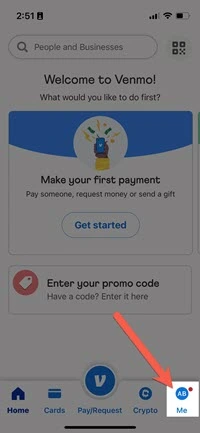
- From the Profile screen, tap on the Gear Icon in the top right corner.
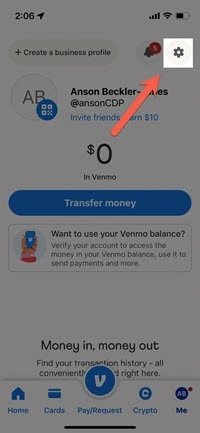
- Tap on Payment Methods tab.
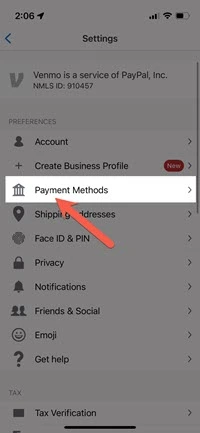
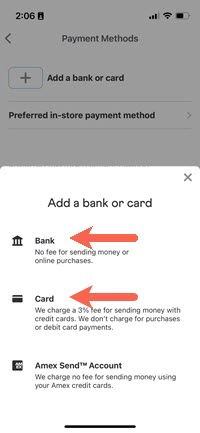
- Tap on Add a Bank or Card.

- You can add your Everwise checking account to Venmo by selecting Bank or your Everwise Debit or Credit Card by selecting Card.
- If you opted to connect your Everwise checking account by selecting Bank and want to connect through microdeposits, tap on VERIFY BANK MANUALLY INSTEAD.
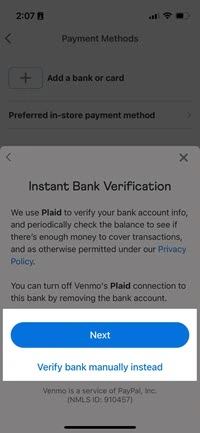
IMPORTANT:
- Make sure to have at least $2 in your checking account to avoid overdraft or other
bank fees. - Micro transactions can take between 1-3 days to complete.
- If micro transactions don’t occur, the account details could have been
entered incorrectly.
- Once your micro transactions have occurred, return to your Payment Method screen and tap on the account you are attempting to verify.

- Tap on Verify (this is also where you would go to Delete the account).
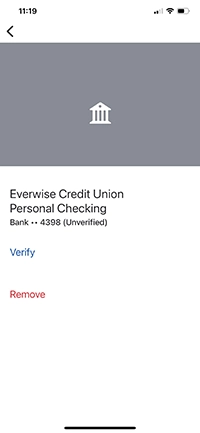
- Enter the 2 deposit amounts from Venmo in chronological order and click Verify.
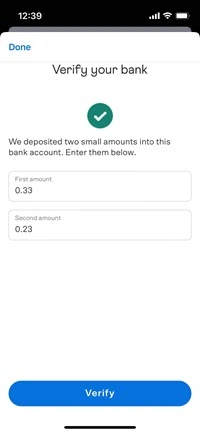
IMPORTANT:
Do not enter a decimal, just start entering the cent value of the deposit. Venmo will format it for you.
Zelle
Zelle has stopped offering its standalone app for person-to-person payments. Instead, this service is only available through financial institutions that offer Zelle through their mobile/online banking services.
While Everwise currently does not participate with Zelle, we are looking at several options to provide our members with secure and convenient person-to-person payments.
You still have options
Apps like Venmo, CashApp, and PayPal allow you to to link your Everwise account and make person-to-person payments.
Subject to membership eligibility requirements. Loans subject to credit approval. Borrower must be a resident of Indiana or Michigan, and for home loans property must be in Indiana or Michigan. All credit union programs, rates, terms, and conditions may change without notice.