

Security Center
Your security comes first. Discover how Everwise protects your accounts and how you can stay alert, informed, and confident online.

Report Fraud to Everwise
If something’s wrong, we’re here to help. Learn how to report lost cards or account fraud and what to do next.


Beware of Scam Texts
No matter where you bank, fraudsters will always want what you've got. And they'll try just about anything to get it. For example, they'll often disguise a text message as an alert from your financial institution about a "pending charge" with a link.
While not all scam texts are the same, they're designed to prey on your natural instinct to protect your account. Remember: never click on any unknown links or share your personal information with these senders. When in doubt, please call us.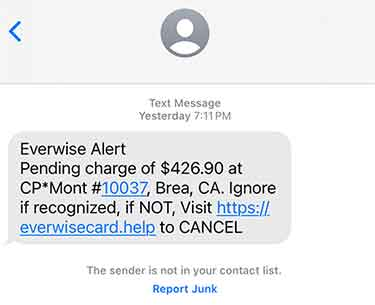
We're constantly on the alert to make sure your accounts are secure, and we encourage you to take fraud as seriously as we do. Always double-check the web address, email address, and phone number of any communication you receive. If there are errors or it seems like the message is trying to create a sudden sense of urgency, it is likely a scam.
If you suspect your Everwise account information has been compromised, stay calm and contact Member Services as soon as possible either with our Contact-Us form or by phone at (800) 552-4745.
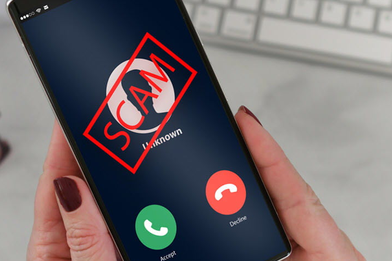
Consumers lose billions of dollars each year to fraud. And the Federal Trade Commission says it's only getting worse.


Learn what the Dark Web is and how to protect your personal and financial information from misuse.
Simple tips and best practices to help you stay safe while browsing, banking, and working online.
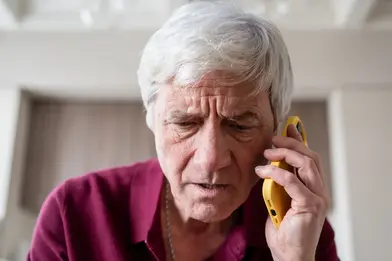
Learn how to recognize common scams and what to do if you or someone you love has been targeted.
Debit and Credit Card Alerts
Debit and Credit Card Alerts
Everwise is committed to protecting your personal information. We provide enhanced protection for our card holders to detect when their card’s information has been exposed on websites that fraudsters use to buy and sell private information.
As long as your contact information is up to date with us, we will alert you if we detect suspicious activity on your card. Depending on the contact information available to us, we will attempt to alert you via text message, phone, email or, ultimately, by letter to your address of record. You can update your contact information:
- Anytime within online banking or on our mobile app
- The next time you visit a branch
- By calling Member Services at (800) 552-4745
If you are set up to receive text alerts, simply respond with a “Y” to verify the transaction. If you did not authorize the transaction and respond with an “N” (or if you receive an alert by phone or email) you will be prompted to call us.
In any event, it’s important that you respond as soon as possible to verify a suspicious transaction. To protect against further unauthorized activity, your card will not be available for use until we hear from you. When you contact us, we can either verify the transaction or guide you through the process of replacing your card.
Remember: We will never call, email, or text you to ask for your Everwise account or card information, secure access code, online banking username/password, or other account IDs, such as your Apple or Google ID. If anyone asks you for this information, please contact your local branch or member services at (800) 552-4745.
Encryption
Encryption
Throughout your Mobile or Online Banking session, all interactions are encrypted between your browser and the online banking platform. Everwise employs some of the strongest levels of encryption available today.
You can identify a secure (encrypted session) by looking for the "closed lock" icon that typically appears in the upper-right corner of the address bar of your browser (location varies depeding ont he browser you use). Additionally, the web address, also called the URL will begin with https://.... This indicates the page you are viewing uses encryption. The "s" stands for "secured."
Firewall
Firewall
Online banking systems are protected 24 hours a day by a variety of security measures, including firewalls that block unauthorized entry.
Enhanced Login Security
Enhanced Login Security
Everwise provides Enhanced Login Security, which significantly increases your level of protection online. Not only will your password and user ID be recognized, but your device will be recognized as well. If we don't recognize your device (maybe you've logged in from a public computer or one you haven't used before) you will be prompted to provide a secure access code, which will be sent to you. This step acts as an additional line of defense against unauthorized access to your accounts.
Note: It is important that you DO NOT share this secure access code. We will NEVER call, email, or text you to ask for your account information, secure access code, card information, or online banking username/password. If anyone asks you for this information, please contact your local branch or member services at (800) 552-4745.
Passwords
Passwords
Secure data starts with a secure password. That's why you cannot use any part of your member number or Social Security Number as your password in our online banking system. We strongly encourage you to create a unique password that only you can provide and is not tied to any personally identifiable information that a hacker could obtain from a publicly available source.
Timed Log-off
Timed Log-off
The Everwise Mobile and Online Banking platforms will log you off after 10 minutes of inactivity. This will reduce the risk of someone else accessing your financial information if you leave your computer or mobile device unattended.
Subject to membership eligibility requirements. Loans subject to credit approval. Borrower must be a resident of Indiana or Michigan, and for home loans property must be in Indiana or Michigan. All credit union programs, rates, terms, and conditions may change without notice.